

Posted by
OSS Lovers Admin
Labels:
Games Nokia,
Nokia,
others,
Sony Ericsson


Crash of the titans (240 x 320)
Posted by OSS Lovers Admin Labels: Games Nokia, Nokia, others, Sony Ericsson


This is a cool game for tenis lovers. Enjoy it..!!
Download : Wimbledon 2009 (v1.0.4 S60v5 Nokia 5800 360x640).jar
X-plore is a file manager for mobile devices,with a wide range of functions on the phone's file system.This software is shareware, with a friendly price and a relaxed registration option.
Features
* View all drives / folders / files on phone in tree view*
* Integrated text and image viewer
* View file details
* Edit file attributes (hidden, read-only, etc)
* Rename and delete files
* Create or edit text files
* Create folders
* Multi-selection
* Copy or move files and folders
* Send files via Bluetooth or infrared
* Extract files from Zip, Rar, Jar archives
* Pack files to Zip archive
* View Word documents
* Hardware device info
* View processes and tasks**
* Built-in program updater
* Viewing, saving files in messaging folders
* Hex viewer and editor
* Search files
* Folder hotkeys
* Simple audio player
* Simple video player***
* Protected folders on Symbian 9.x are not accessible
** Available only on Symbian 6/7/8
*** Available on Symbian 7.0s and higher
Download : X-plore v1.30 (S60v3, S60v5).sisx


SmartMovie is a video player for your mobile device,with a counterpart converter utility for the PC.With the converter, you may prepare any video clip for optimal playback on your mobile device.
Features
* Standard AVI format, allowing you to preview converted files on your PC
* Also plays MP4V, FLV and 3GP file formats
* Player uses the phone screen in portrait or landscape mode, utilizing the full screen size of the device
* Rescaling of video to utilize the full screen area
* Support for subtitles - allowing you to watch movies in different languages
* Friendly PC converter - preview videos on PC, select parts you want to convert, change conversion quality
* Converter supports DirectShow codecs, so you may use video codecs downloadable from the internet
* Fast conversion; on a standard PC conversion is 5x faster than the video clip playback time.
You'll convert entire movie in just a few minutes
* Quality rescale algorithm in player, delivering best possible picture quality
* Customizable video player (brightness, language, volume, and more)
* User-friendly interface - watch movies, don't waste time configuring obscure settings
Download : Lonely Cat Games SmartMovie v4.0 Touch & Full S60v5 SymbianOS9.4 [5800-N76].rar


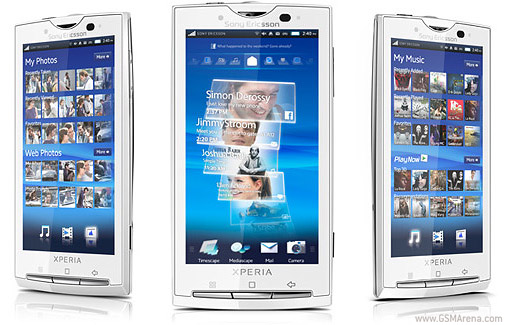
Ini Adalah salah satu HP Sony multifungsi yang akan dikeluarkan kurang lebih tahun 2010 yang akan datang. HP ini mirip dengan Nokia 5800 XM tapi HP ini dilengkapi dengan Camera yang cukup canggih,yang dilengkapi feature smile detection. Jadi HP ini setengah Camera Digital Setengah HP,karena resolusi kameranya 8 MP. Untuk lebih jelasnya reviewnya dapat dilihat di bawah ini. Moga aja harga HP ini tidak menguras kantong kita ya.
Size
Dimensions : 119 x 63 x 13 mm
weight : 135 g
Display
Type : TFT capacitive touchscreen, 65K colors
Size : 854 x 480 pixels, 4.0 inches
- Scratch-resistant surface
- Accelerometer sensor for auto-rotate
- Timescape/Mediascape UI
Sound
Alert Type : Vibration; Downloadable polyphonic, MP3 ringtones, compose
Spekerphone : Yes, with stereo speakers
- 3.5 mm audio jack
Memory
Internal : 1 GB storage, 256 MB RAM
External : microSD (TransFlash), up to 16GB, 8GB included,
Data
GPRS : Class 10 (4+1/3+2 slots), 32 - 48 kbps
HSCSD : no
Edge : Class 10, 236.8 kbps
3G : HSDPA, 10.2 Mbps; HSUPA, 2 Mbps
WLAN : Wi-Fi 802.11b/g, DLNA
Bluetooth : Yes, v2.1 with A2DP
Infrared : no
USB : Yes, v2.0 mini USB
Camera
Primary : 8 MP, 3264x2448 pixels, autofocus, LED flash
Video : Yes
Secondary : Yes
Features : Touch focus, image stabilization, geo-tagging, face and smile detection
Feature
OS : Android OS 1.6
CPU : Qualcomm QSD8250 Snapdragon 1 GHz processor
Messaging : SMS (threaded view), MMS, Email, Push email, IM
Radio : No
Games : Yes
Colors : Sensous Black, Luster White
GPS : Yes, with A-GPS support
Java : -
Others :
- MP4/ H.263/ H.264/ WMV player
- MP3/ e-AAC+/ WMA/ RA player
- Google Search, Maps, Gmail,YouTube, Calendar, Google Talk
- Voice memo
- Digital compass
Battery
General : Standard battery, Li-Ion 1320 mAh(BL-5J)
Stand-by : -
Talk time : -
Music Play : -
source : GSM ARENA
Read More..


Kode akses Nokia
*#30# : Menampilkan ‘private number’ yang menghubungi anda.
*#73# : Mereset timer ponsel dan skor game (pada beberapa ponsel).
*#7780# : Mengembalikan ke setting pabrik (factory setting).
*#2820# : Alamat IP perangkat Bluetooth (untuk ponsel yang mempunyai Bluetooth).
xx# : Akses cepat ke nama/nomer telepon di phone book ponsel, misalnya 20#.
Tombol off : Menekan dengan singkat, untuk berpindah antar profile.
*3370# : Mengaktifkan EFR(Enhanced Full Rate) Codec (tidak berlaku di ponsel Symbian).
#3370# : Menonaktifkan EFR Codec.
*#4270# : Mengaktifkan Half Rate Codec.
*#4270# : Menonaktifkan Half Rate Codec.
*#0000# : Menampilkan versi software ponsel.
*#9999# : Kode alternatif jika *#0000# tidak bekerja.
*#06# : Melihat nomor IMEI (Internasional Mobile Equipment Identity).
*#21# : Mengecek nomor pengalihan “All Call” yang digunakan.
*#2640# : Menampilkan kode keamanan ponsel yang digunakan.
*#43# : Mengecek status “Call Waiting”.
*#61# : Untuk mengecek nomor pemanggil yang dialihkan ketika tak anda jawab.
*#62# : Mengecek nomor pemanggil yang dialihkan ketika ponsel anda di luar jangkauan.
*#67# : Mengecek nomor pemanggil yang dialihkan ketika ponsel anda sedang sibuk.
**21*number# : Menghidupkan pengalihan “All Call” pada nomor yang diisi.
**61*number# : Menghidupkan pengalihan “No Reply” pada nomor yang diisi.
**67*number# : Menghidupkan pengalihan “On Bussy” pada nomor yang diisi.
*#67705646# : Mengganti logo operator logo pada Nokia 3310 dan 3330.
*#746025625# : Menampilkan status SIM Clock.
*#7760# : Menampilkan kode pabrikan (sebagian besar ponsel tipe lama).
*#92702689# : Memunculkan : 1. Serial Number, 2. Date Made, 3. Purchase Date, 4. Date of last repair, 5.Transfer user data. Keluar dari mode ini harus merestart ponsel ( pada beberapa ponsel ).
Kode akses Sony Ericsson :
*#06# : Melihat nomor IMEI (Internasional Mobile Equipment Identity).
*#0000# : Mereset bahasa kembali ke English.
> * < < * < * : Service Menu - menampilkan versi software ponsel. Tekan “Yes” berulang-ulang untuk melihat semua data software dan tekan “>” untuk melihat semua teks yang terdapat pada ponsel.
< * * < : Mengunci SIM Card. Sortcuts : 1. Menyimpan nomor “Missed Call” di direktori ponsel. Cari menu “Missed Call”, tekan “Yes” untuk menampilkan nomor yang dituju. Tekan nomor apa saja ( 0 sampai 9 ), kemudian tekan “clear” sekali untuk memblok nomor tersebut, kemudian tekan dan tahan “<” sampai muncul “Store”, tekan “Yes”. 2. Menyembunyikan nomor. Setelah menekan nomor yang dituju dan sebelum menekan “Yes”, tekan ‘ > ‘ 2 kali untuk memilih “Hide Id?” dan tekan ‘Yes’.
3. Mengecek level batere ketika ponsel mati (off ).
Tekan ‘No’ secara cepat 1 x dan tunggu hingga tampilan baterai terlihat.
4. Menyimpan nomor di memori ponsel (bukan SIM Card).
Ikuti prosedur normal untuk menyimpan nomor. Ketika tampilan untuk menyimpan terlihat tekan ‘#’ sekali dan lokasi yang diinginkan, atau tekan ‘#’ 2 kali untuk melihat posisi lanjutan.
5. Menghubungi nomor dari pesan SMS.
Mengarahkan kursor pada nomor yang tertulis, kemudian tekan “Yes”.
Shortcut Penampilan Gambar :
(Berlaku di sebagian besar ponsel Symbian).
Ketika melihat image atau gambar di galeri, tekan :
1 : untuk memutar gambar ke kiri.
2 : untuk memutar gambar ke kanan.
5 atau 7 : untuk memperbesar (zoom) gambar.
* : untuk tampilan fullscreen atau non fullscreen.
Catatan : perintah angka di atas bisa berbeda di setiap ponsel.
Hard Reset :
Peringatan !!! Semua data ponsel akan hilang.
Dalam keadaan ponsel mati (off), tekan secara bersamaan tombol telepon (bicara), angka 3, dan tombol * (bintang). Kemudian dalam keadaan menekan ketiga tombol tersebut, tekan tombol On. Trik ini berlaku di sebagian besar ponsel Nokia.
Update Tambahan Nokia GSM
Nokia 21xx
Kode Penjelasan
*#06# Kode IMEI
*#3283# Minggu Produksi/Bulan & Tahun
*#9999# Versi Software
Nokia 32xx
Kode Penjelasan
*#06# Kode IMEI
*#0000# Versi Software
*#92702689# Menu Layanan
*#746025625# Sim Clock Stop
*3370# EFR aktif, suara lebih jernih, baterai cepat habis.
#3370# EFR inactive.
*4720# HR aktif, suara tidak lebih jernih, baterai tahan lama.
#4720# HR OFF.
Nokia 51xx
Kode Penjelasan
*#06# Kode IMEI
*#0000# Versi Software
*#92702689# Menu layanan
*3370# EFR aktif, suara lebih jernih, baterai cepat habis.
#3370# EFR inactive.
*4720# HR aktif, suara tidak lebih jernih, baterai tahan lama.
#4720# HR OFF.
Nokia 61xx
Kode Penjelasan
*#06# Kode IMEI
*#0000# Versi Software
*#92702689# Menu layanan
*3370# EFR aktif, suara lebih jernih, baterai cepat habis.
#3370# EFR inactive.
Nokia 81xx
Kode Penjelasan
*#06# Kode IMEI
*#8110# Versi Software, tanggal produksi & nomor model
*#92702689# Menu layanan
Nokia 88xx
Kode Penjelasan
*#06# Kode IMEI
*#0000# Versi Software
*#92702689# Menu Layanan
*3370# EFR aktif, suara lebih jernih, baterai cepat habis.
#3370# EFR inactive.
Nokia 90xx
Kode Penjelasan
*#06# Kode IMEI
*#6823711
58412125# Versi Software
*#3283# Tanggal Produksi


Size
Dimensions : 111 x 51.7 x 15.5 mm, 83 cc
weight : 109 g
Display
Type : TFT resistive touchscreen, 16M colors
Size : 360 x 640 pixels, 3.2 inches
- Proximity sensor for auto turn-off
- Accelerometer sensor for auto-rotate
- Handwriting recognition
Sound
Alert Type : Vibration; Downloadable polyphonic, MP3 ringtones
Spekerphone : Yes, with stereo speakers
Memory
Internal : 81 MB storage, 128 MB RAM
External : microSD (TransFlash), up to 16GB, 8GB included,
Data
GPRS : Class 32
HSCSD : yes
Edge : Class 32
3G : HSDPA, 3.6 Mbps
WLAN : Wi-Fi 802.11 b/g, UPnP technology
Bluetooth : Yes, v2.0 with A2DP
Infrared : no
USB : Yes, v2.0 micro USB
Camera
Primary : 3.15 MP, 2048x1536 pixels, Carl Zeiss optics, autofocus, LED flash
Video : Yes, VGA@30fps
Secondary : Videocall camera
Feature
OS : Symbian OS v9.4, Series 60 rel. 5
CPU : ARM 11 434 MHz processor
Messaging : SMS, MMS, Email, Instant Messaging
Radio : Stereo FM radio with RDS
Games : Yes + Java downloadable
Colors : Black, Red, Blue
GPS : Yes, with A-GPS support; Nokia Maps 2.0 Touch
Java : Yes, MIDP 2.0
Others : - WMV/RV/MP4/3GP video player
- MP3/WMA/WAV/RA/AAC/M4A music player
- Voice command/dial
- Document viewer (Word, Excel, PowerPoint)
- T9
- Photo editor
Battery
General : Standard battery, Li-Ion 1320 mAh(BL-5J)
Stand-by : Up to 406 h (2G) / 408 h (3G)
Talk time : Up to 8 h 45 min (2G) / 5 h (3G)
Music Play : Up to 35 h
resource : www.gsmarena.com
Read More..
This is applaication to control your PC or Laptop with your phone (touchscreen phone).
If doesn't work please call me imediatly...:D
soory for my bad english.
Good Luck
resource : http://forum.dailymobile.se
http://symbianworld.org/

Subscribe to:
Posts (Atom)